Manatal Setup

Manatal is a recruitment and applicant tracking platform.
The Microkeeper integration creates a new employee and starts their onboarding when a hired candidate is shared from Manatal.
This guide covers how to:
- Connect Manatal to Microkeeper.
- Send one or more hired candidates to Microkeeper.
- Map Manatal custom fields to Microkeeper fields.
- Understand what candidate data is transferred.
Connect Manatal to Microkeeper
- Create a Manatal account.
- In Manatal, add Microkeeper as an integration through Administration > Integrations.
- Copy the API key from Manatal.
- In Microkeeper, go to Settings > Employees and add the API key.
-5c446.png)
Send a hired candidate to Microkeeper
- In Manatal, open the relevant job.
- Move the candidate to the Hired pipe.
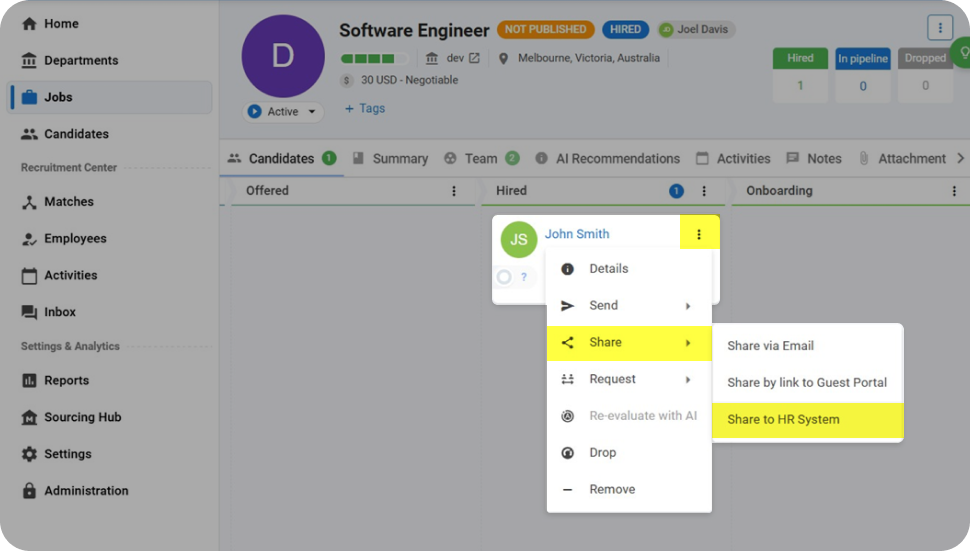
- Open the candidate, click the 3 Dots, then select Share > Share to HR system.
- A new employee is created in Microkeeper and a welcome SMS and email are sent.
- Move the candidate to the Onboarding pipe in Manatal if you use that pipe to track employee onboarding.
-4bae7.png)
Send multiple hired candidates to Microkeeper
Use bulk selection when multiple candidates need to be shared with Microkeeper.
- At the top of the pipe, click the 3 Dots.
- Select Select All > Share > to HR system.
- The selected candidates are sent to Microkeeper and each receives a welcome SMS and email.
- Move the candidates to the Onboarding pipe in Manatal if you use that pipe to track employee onboarding.
-bda40.png)
Map Manatal custom fields
Manatal custom fields can map to supported Microkeeper employee fields and to custom fields configured in your Microkeeper account.
Standard Microkeeper fields
Manatal custom field keys can map to supported Microkeeper employee fields. Some examples are:
| Manatal custom field key | Microkeeper field |
|---|---|
| dob | Date of Birth |
| nokname | Next of Kin Name |
| taxfilenumbertfn | Tax File Number |
| bankaccount1bsb | Bank Account BSB |
| entitledannualleave | Annual Leave Entitlement |
Account-specific custom fields
If your Microkeeper account has custom fields configured, Manatal custom fields can map to these fields.
The Manatal custom field key must match the Microkeeper custom field name after spaces are removed and the name is converted to lowercase.
For example, a Manatal field key of favouritepizza can map to a Microkeeper custom field named Favourite Pizza.
Account-specific custom field values are validated according to the Microkeeper field type. Dates are formatted as YYYY-MM-DD, booleans are converted to yes or no, and numeric or alphanumeric IDs are cleaned automatically.
What data is transferred from Manatal to Microkeeper
When a candidate is shared with Microkeeper, their candidate data is mapped to a new employee record. Some fields are only populated when Manatal contains a value.
Candidate fields
| Manatal field | Microkeeper field |
|---|---|
| id | Employee ID (Third Party Primary Key) |
| full_name | Given Name and Surname |
| phone_number | Mobile Number |
| contact | Home Phone Number |
| gender | Gender |
| address | Address, City, State, Postcode and Country |
| employee_status | Employment Status |
| expected_salary and expected_frequency | Pay Rate and Salary Type |
| employee_job | Position |
| start_date, or hired_date when no start date is provided | Start Date |
Learn more about the Manatal integration with Microkeeper or contact our support team if you need help.