Generate Timesheet from Roster
You can generate all your timesheet data from the roster calendar, clocking in hours without the need for your employees to do so.
Navigate
Menu > Rosters > Generate Timesheet
Selecting employees
The form below allows you to select which employees you would like to generate the timesheet for.
This gives you the ability to have some employees clocking their hours and others generating their timesheet data off the roster.
Select Employees
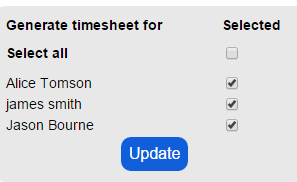
Click the Update button to save changes.
Generating timesheet
Generate timesheet from roster
-917f8.png "Generate timesheet from roster")
Select the fiscal year and week that you want to generate the timesheet data for.
Only the weeks that you have saved to the roster calendar will be available.
Click the Generate timesheet button.
This will copy your roster data into timesheet data.
The How column on the timesheet will illustrate that these entries were created from the roster.